Monthly lead-gen budget
What is a lead generation budget calculator?
A lead generation budget calculator works backward from the number of leads you need each month to the marketing budget required to get them, using your expected cost per lead. B2B demand generation teams, agencies, SaaS companies, and local service businesses use it to set Google Ads, LinkedIn Ads, Meta Ads, and outbound budgets, justify spend to leadership, and convert monthly lead targets into daily pacing caps.
Monthly lead-gen budget
Target leads × cost per lead
Embed this free calculator on your website—copy the snippet after signup and keep the Built with Calclet link for attribution (or upgrade to remove branding).
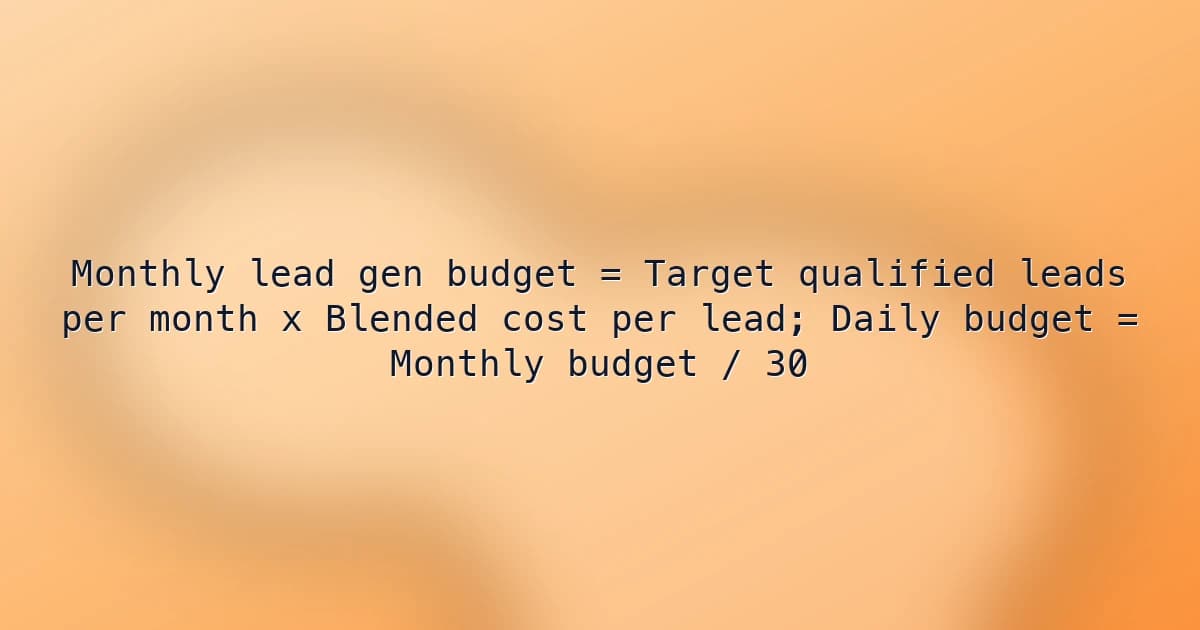
Lead generation budget formula
Multiply target qualified leads by blended cost per lead to get the monthly budget, then divide by 30 for an approximate daily budget. Blended cost per lead is total spend divided by total leads across every channel in your plan.
Monthly lead gen budget = Target qualified leads per month x Blended cost per lead; Daily budget = Monthly budget / 30- Target leads from a revenue goal = (Revenue goal / Average deal value) / Lead-to-customer rate.
- Blended cost per lead = Total planned spend across channels / Total expected leads, weighted by your actual channel mix.
- Maximum affordable cost per lead = (Average deal value x Lead-to-customer rate) / Target return multiple.
Inputs explained
Use one lead definition for both inputs. If you target qualified leads, the cost per lead must also be the cost per qualified lead, not the cost per raw form fill.
- Target qualified leads / month
- The number of marketing-qualified or sales-accepted leads needed to hit pipeline and revenue goals, ideally calculated backward from deals needed and your lead-to-customer rate. Also check sales capacity: more leads than SDRs and account executives can follow up on wastes budget.
- Blended cost per lead ($)
- Average cost per qualified lead across all planned channels, such as paid search, paid social, LinkedIn, review sites, events, and outbound, weighted by how many leads each will deliver. Use the last 60 to 90 days of CRM-verified data, and decide whether to include agency fees, tools, and content costs or only media spend.
Example lead generation budget calculation
A B2B team needs 12 new customers worth $25,000 each to hit a $300,000 new-revenue goal from one month of leads. At a 10% lead-to-customer rate, that requires 120 qualified leads. With a blended cost per lead of $185, the budget is 120 x $185 = $22,200, or about $740 a day. Adding $5,000 in agency fees raises the fully loaded cost per lead to about $226.67.
Put this calculator on your site
We'll copy this tool into your Calclet account—tweak branding and fields, then paste the embed on WordPress, Webflow, Shopify, or any HTML page. Every embed can link back to Calclet for discovery.
How to use the monthly lead-gen budget
- Input target qualified leads per month based on pipeline or sales-capacity requirements, not raw top-of-funnel form fills.
- Enter blended cost per lead ($) from recent channel performance weighted by your planned spend mix for the month.
- Review implied monthly spend to confirm budget sufficiency before launch, then compare against approved marketing allocations.
- Use approximate daily budget (÷30) as a pacing guide, adjusting for seasonality and weekday demand concentration where needed.
Common lead generation budgeting mistakes
- Targeting qualified leads but using cost per raw form submission, which understates the budget needed.
- Assuming cost per lead stays flat as spend scales, when extra budget usually buys more expensive leads.
- Using a simple average of channel cost per lead instead of weighting by each channel's share of leads.
- Setting a lead target that sales cannot follow up on, wasting budget on leads that go cold.
- Leaving agency fees, software, content production, and list data out of the true cost per lead.
- Ignoring sales cycle length, so this month's spend is judged on revenue that will not close for months.
- Budgeting a new channel at the same cost per lead as proven channels before running a test.
Lead budget planning context
- CPL variance by channel and intent
- Branded search and warm retargeting often produce lower CPL than cold social or broad outbound, so blended assumptions should reflect channel mix.
- Lead quality and downstream efficiency
- Lower CPL does not always mean better economics if qualification and opportunity conversion rates decline.
- Budget pacing discipline
- Teams commonly monitor daily or weekly pacing versus lead targets to catch spend gaps and quality drift before month-end.
FAQs
How do I calculate my lead generation budget from a revenue goal instead of a lead target?
Work backward through the funnel. Divide the revenue goal by average deal value to get deals needed, divide deals by your lead-to-customer rate to get leads, then multiply by cost per lead. For a $300,000 goal at $25,000 per deal, you need 12 deals; at a 10% close rate from lead, that is 120 leads, and at $185 per lead the budget is $22,200.
How do I calculate a blended cost per lead when each channel costs something different?
Divide total planned spend by total expected leads, not a simple average of channel costs. If 48 leads come from paid search at $150, 42 from LinkedIn at $260, and 30 from outbound at $140, total spend is $22,320 for 120 leads, a blended cost per lead of $186. Shifting the mix toward the expensive channel raises the blended figure even if each channel's cost stays the same.
My budget is capped at $15,000 a month—how many leads can I realistically get, and how do I close the gap?
Divide budget by cost per lead: $15,000 / $185 is about 81 leads, roughly 39 short of a 120-lead target. Close the gap by moving spend to your lowest-cost qualified channel, improving landing page conversion rates to lower cost per lead, adding organic, referral, and partner sources, or presenting leadership with the revenue impact of the shortfall to justify more budget.
What is the maximum cost per lead I can afford and still be profitable?
Maximum cost per lead = (average deal value x lead-to-customer rate) / target return multiple. At $25,000 per deal and a 10% close rate, each lead is worth $2,500 in revenue; for a 3x return, you can afford up to about $833 per lead. Use gross margin or lifetime value instead of first-year revenue if those better reflect profit.
We increased the budget but leads did not grow proportionally—why did cost per lead rise?
Ad platforms serve your best-converting audiences first, so extra spend reaches colder audiences, higher bids, or less relevant keywords, raising the cost of each additional lead. Scale in steps of around 20% to 30%, watch the cost of the extra leads rather than the average, and add new channels or audiences instead of pushing one campaign past its efficient limit.
I set a daily budget in Google Ads or Meta, but some days it overspends—will I blow my monthly budget?
Google Ads can spend up to twice your average daily budget on a given day, but caps monthly spend at about 30.4 times the daily budget, so $740 a day means up to about $22,496 a month. Meta can also exceed a daily budget on some days while staying within a weekly limit. Use the daily figure from this calculator as the average, and check pacing weekly.
How much budget should I set aside to test a new lead generation channel with no cost-per-lead history?
Budget enough to generate a meaningful sample of leads, often 30 to 50, at an estimated cost per lead. At $185 per lead, 40 leads requires about $7,400. Set a test window of four to eight weeks, track lead quality in your CRM, and only add the channel to your blended cost per lead once results are stable.
We hit our lead target, but sales says most leads are unqualified—how should I fix the budget?
Budget on qualified leads, not raw form fills. If only 40% of raw leads qualify, a $74 raw cost per lead is really $185 per qualified lead. Track qualification rate by channel, cut spend on sources that deliver volume without quality, and add qualifying questions or tighter targeting so the leads you pay for match what sales can close.
Our B2B sales cycle is six months—how do I justify this month's lead generation budget?
Measure leading indicators while revenue catches up: qualified leads, meetings booked, opportunities created, and pipeline value per dollar spent. Using your historical lead-to-customer rate and deal value, report expected revenue from this month's leads alongside actual closed revenue from leads generated six months ago.
Should agency fees, software, and content costs be included in cost per lead?
Report both. Media cost per lead is useful for comparing channels and setting ad budgets, while fully loaded cost per lead includes agency retainers, tools, content production, and data costs, giving finance the true cost of each lead. Adding $5,000 in fees to $22,200 of media for 120 leads raises cost per lead from $185 to about $226.67.
Related calculators
Related guides
Step-by-step articles on building, embedding, and ranking calculator pages like this one.
Category: B2B marketing budget planningTopics: Lead generation budgeting, Cost per lead planning, Demand generation forecasting
Last reviewed: 2026-05-07
Reviewed by: Souhayb Kama Ldine